

“AI committee” phishing: how TA419 steals Microsoft 365 sessions
“Would you be willing to join our AI Policy Advisory Committee?” Flattering, right? That’s exactly the trap. According to a report published on October 1, 2026, by security firm Proofpoint, a China-aligned group ran “AI committee” phishing campaigns to steal Microsoft 365 access from artificial intelligence experts. And standard multi-factor authentication (MFA) didn’t stop it.
Not an AI policy expert? The technique can still target anyone. Here’s how it works and how to protect yourself.
What happened?
Proofpoint tracks this group as TA419. It’s China-aligned and driven by espionage. Since at least April 2025, it has targeted people working at think tanks, defence contractors, universities and law firms, mainly in the United States and Japan.
Starting July 8, 2026, TA419 impersonated very real people: a former senior official at the White House Office of Science and Technology Policy, then a well-known economist. The messages invited experts to join a fake “AI Policy Advisory Committee” or to contribute to a supposed Senate Foreign Relations Committee report on AI export controls.
In February 2026, the group had already impersonated a senior employee of Anthropic, the company behind the Claude AI, with an email asking for feedback on military use of Claude, Nextgov/FCW also reports. Proofpoint doesn’t say how many targets fell for it.
AI committee phishing: what does this trap email look like?
Here’s a fictional AI committee phishing example, inspired by the messages Proofpoint describes. The committee name and address are made up; in the real campaigns, TA419 impersonated real people instead. The red numbers mark the warning signs.
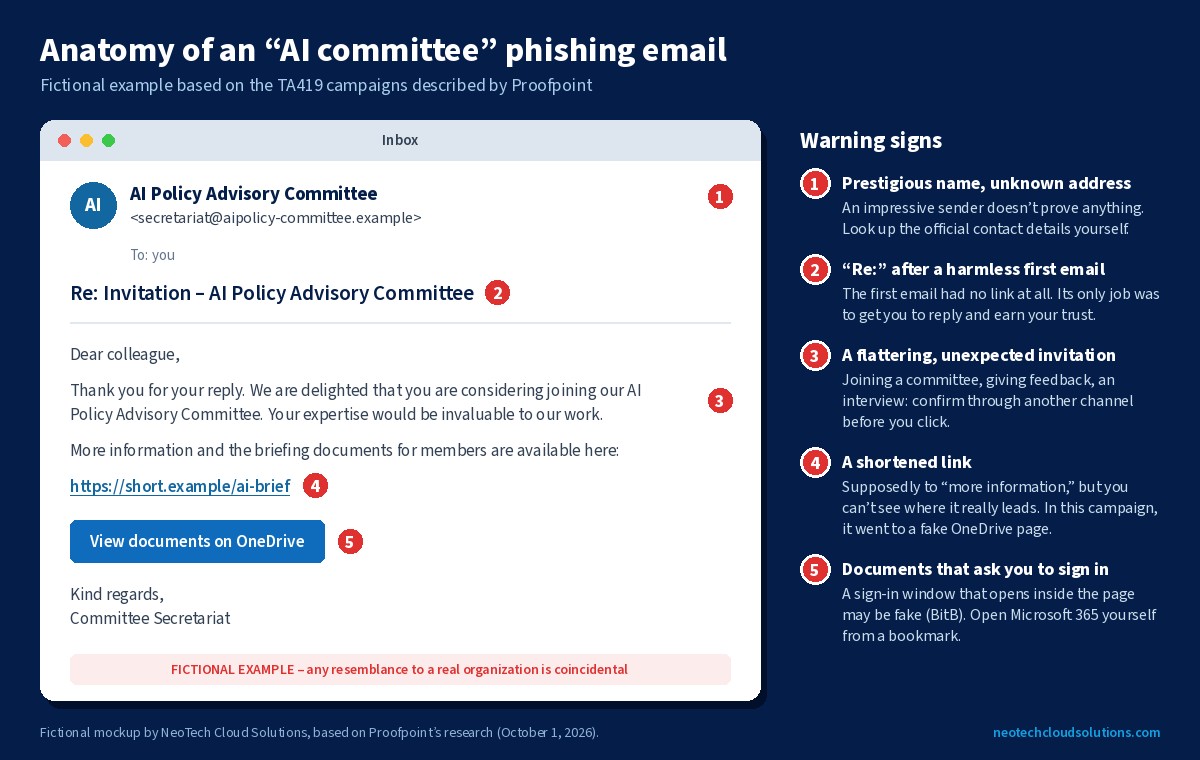
None of these signs is proof on its own. It’s the combination that should make you slow down: a flattering, unexpected invitation, followed by a link to documents that ask you to sign in.
How does AI committee phishing work?
- A harmless first email. No malicious link: just a believable invitation, to make contact and earn the target’s trust.
- The target replies. Once the conversation is going, the fake expert sends a shortened link, supposedly to “more information.”
- A fake OneDrive. The link goes through an imitation OneDrive loading page and a Cloudflare check that screens visitors.
- A fake sign-in window. The victim sees a list of documents. When they click, a fake browser window opens inside the page: this is the “browser-in-the-browser” (BitB) technique. Inside it, Microsoft’s real sign-in page is relayed live through the attacker’s server. That’s called an adversary-in-the-middle (AitM) attack.
- The session is stolen. The victim enters their password and MFA code. Everything works, because it really is Microsoft answering. But along the way, the attacker grabs the session cookies that give access to the account. According to Proofpoint, the group’s tool even automatically accepts “Stay signed in” to extend the stolen session.
Why isn’t standard MFA enough?
A text code, an app code or a phone approval proves it’s really you signing in. But they don’t check which website you’re on. If an attacker’s server relays Microsoft’s real page, your code goes through… and the attacker walks away with the session.
There’s more bad news for everyone: the kit TA419 used is built on free, open-source tools, Frameless BitB and Evilginx. In other words, this isn’t a weapon reserved for spies.
Sound familiar? Our article on device code phishing on Microsoft 365 covered another scam that gets around MFA through real Microsoft pages. The technique is different, and so is the fix: there, you block the device code flow. Here, the best answer is phishing-resistant MFA.
How do you protect yourself from AI committee phishing? 6 practical steps
Tick these off one by one. The first two directly block this kind of attack; the others limit the damage if an account does get compromised.
Checklist: 6 steps
1. Switch to passkeys
Proofpoint recommends it explicitly: phishing-resistant, origin-bound authentication such as passkeys. A passkey only works on Microsoft’s real domain. On the attacker’s site, your device simply won’t offer it. The Canadian Centre for Cyber Security also strongly recommends FIDO-based solutions in its guide on multi-factor authentication. Microsoft explains how to enable passkeys in Microsoft Entra ID. Start with administrator accounts, management and accounting.
2. Require them for sensitive accounts
With Conditional Access in Microsoft Entra ID P1 (included in Microsoft 365 Business Premium), you can require a phishing-resistant authentication strength for specific accounts or apps. That way, even a stolen password and code are no longer enough.
3. Verify unexpected invitations another way
That’s Proofpoint’s other recommendation. A flattering invitation, an interview request, a “partner” who wants your feedback: before you click, confirm through another channel. Look up the person’s official contact details yourself instead of using the ones in the email.
4. Be wary of documents that ask you to sign in again
A shared document that suddenly opens a sign-in window deserves a second look. Here’s a handy test: try dragging the window outside your browser. A fake BitB window is part of the page, so it stays trapped inside the tab. When in doubt, close everything and open Microsoft 365 yourself from a bookmark.
5. Watch sign-ins and revoke sessions
Look out for unusual sign-ins, new inbox rules and newly added MFA methods. If an account may have been compromised, changing the password isn’t enough: you also need to revoke active sessions, since the session is exactly what the attacker stole.
6. Report and document
Report the incident to the Canadian Centre for Cyber Security. If personal information may have been accessed, Quebec’s Law 25 requires you to document the incident and assess the risk of serious injury, as the Commission d’accès à l’information (in French) explains.
How can NeoTech help?
At NeoTech Cloud Solutions, we set up and secure Microsoft 365 for Greater Montreal SMBs, including passkeys and Conditional Access. Our cyber monitoring plans add automated 24/7 monitoring of your Microsoft 365 accounts and devices, with response from our on-call technician depending on the plan.
Book your free cyber check
Would your Microsoft 365 accounts hold up against a fake sign-in window? Do your sensitive accounts use phishing-resistant MFA? In one short meeting, we’ll go through it with you, and you’ll walk away with a clear list of priorities. No jargon, no commitment.
Prefer to talk to us directly? Call 438-476-2322 or email info@neotechcloudsolutions.com.
Sources
- Proofpoint: Hallucinating Credibility: China-Aligned TA419 Impersonates its Way into US AI Policy Circles (October 1, 2026)
- Nextgov/FCW: China-linked hackers posed as former US officials, Anthropic employee to target AI experts (October 1, 2026)
- Microsoft Learn: How to enable passkeys (FIDO2) in Microsoft Entra ID
- Microsoft Learn: Conditional Access authentication strengths
- Canadian Centre for Cyber Security: Secure your accounts and devices with multi-factor authentication (ITSAP.30.030)
Illustration: Mohamed Hassan (Pixabay, CC0), via Wikimedia Commons. Fictional email mockup: NeoTech Cloud Solutions.