

Malicious Custom GPTs: how a fake ChatGPT model infected PCs
You search Google for “chatgpt,” click the top result and land on the real chatgpt.com. A few clicks later, your computer is infected. That’s the scenario security firm Huntress documented on September 28, 2026: malicious Custom GPTs, built by scammers, were used as bait to install a remote access trojan (RAT) on Windows PCs.
The good news: the main defence fits in one sentence, and your whole team can start using it today.
What happened
Custom GPTs are versions of ChatGPT configured for a specific task, with their own instructions. They’re hosted on the real chatgpt.com site, with their name at the top of the page and the builder’s profile right underneath.
Scammers took advantage of that trust. They created a Custom GPT called “Plus 5.6” so visitors would mistake it for a new official model. The only giveaway: under the title, the page said it came from a “community builder,” meaning an outside creator, not OpenAI.
According to Huntress, its team handled at least 40 incidents tied to the malicious site used in this campaign, two of them confirmed to have started with a Custom GPT. OpenAI took down the first GPT on September 25 after Huntress reported it. However, a new GPT linked to the same campaign turned up on September 27, and it was still online when the report was published.
How malicious Custom GPTs work, step by step
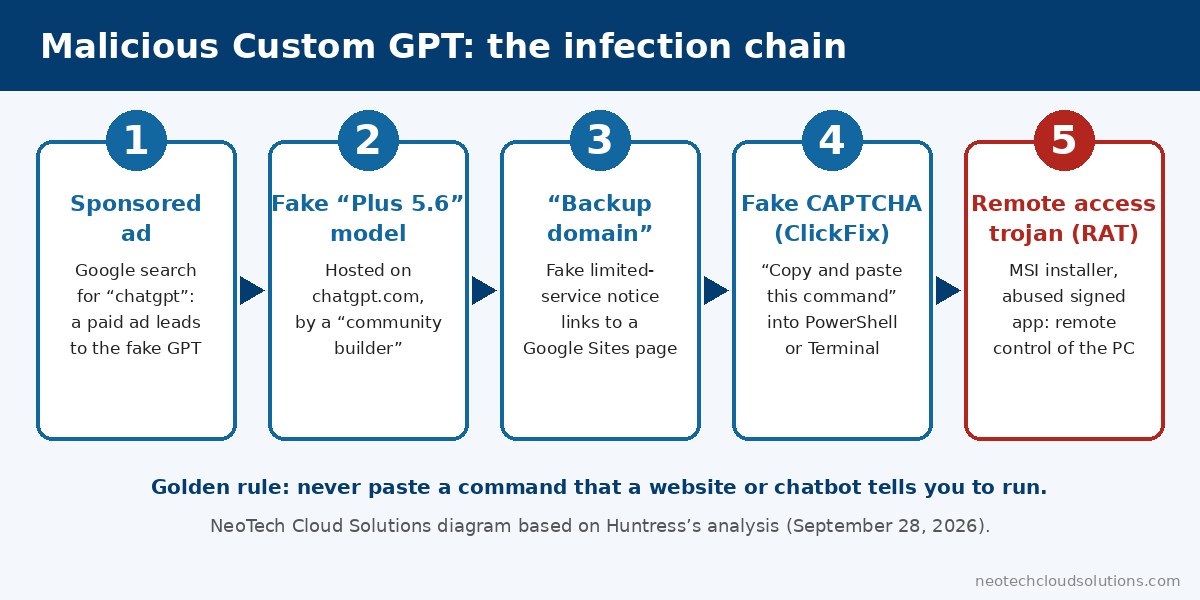
- A paid ad. In some cases, the victim searched Google for “chatgpt.” A sponsored result, placed above the regular results, led straight to the fake GPT.
- A fake service notice. Whatever you asked, the GPT replied with a “Service Availability Notice”: service was supposedly limited on the primary domain. To continue, you had to upgrade to Plus or use a “backup domain.”
- A fake CAPTCHA. That “backup domain” was a Google Sites page dressed up as a Cloudflare security check.
- The ClickFix trap. The page told you to copy a command and paste it into PowerShell or Terminal. This is known as a ClickFix attack: the victim runs the malicious code themselves.
- The infection. The command downloaded an installer that used a legitimate Canon-signed program (and, in a second wave, a Stardock-signed one) to quietly load the malicious code.
At the end of the chain is a full-featured RAT. According to Huntress, it can take remote control of the screen, capture the camera, microphone and system audio, search the contents of files and install more malware. It’s also built to evade security tools, and it puts itself back if you remove just one of its startup mechanisms.
Why this scam works so well
What makes these malicious Custom GPTs dangerous is that they stack up signals of trust: a Google ad, the chatgpt.com address, a Google-hosted page and a Cloudflare logo. Nothing looks like a shady website.
Next, antivirus alone isn’t always enough. In at least one incident, Microsoft Defender did quarantine the installer. But it was already too late: the program had run, and its persistence mechanisms carried the attack forward.
Finally, this isn’t a one-off. Huntress says it has already seen scammers abuse shared ChatGPT and Grok conversations, as well as Claude Artifacts pages, to get people to run commands. These traps often stay online for only hours or days, but that’s enough to claim victims.
Worth noting: OpenAI says it plans to gradually replace Custom GPTs with “plugins.” The attack itself doesn’t depend on any one product, though: bait on a trusted platform, then a command to paste.
AI usage rules to give your team

Many businesses already use ChatGPT, Copilot or other AI tools, often without written rules. This campaign shows it’s time to have some. Here are 6 simple rules, whether you’re self-employed, a small business or a larger organization.
1. Never paste a command that a website or chatbot tells you to run
This is the golden rule. No real CAPTCHA asks you to open PowerShell, Terminal or the Windows Run box. If a page or an AI asks you to, close it and tell your IT contact.
2. Open AI tools from a bookmark, not a search
Create a bookmark to the official address of the tool your business has approved. That way, nobody clicks a sponsored ad to “find ChatGPT.”
3. Don’t use “community” GPTs or assistants without approval
A GPT built by a third party isn’t an OpenAI product, even if it lives on chatgpt.com. Before using one, check who built it. When in doubt, ask.
4. Be wary of “limited service” notices and “backup domains”
A real service doesn’t send you to another website to keep going. That’s a red flag, just like an unexpected payment request.
5. Keep sensitive information out of unapproved tools
Client personal information, passwords, financial data: keep them for tools your business has approved. In Quebec, Law 25 requires you to protect the personal information you hold. The Canadian Centre for Cyber Security also has a good guide on the risks of generative AI.
6. Protect devices with more than antivirus
Endpoint detection and response (EDR) watches behaviour, not just known files. Huntress itself recommends watching for specific behaviours, such as PowerShell launching an installer from a temporary folder. But someone still has to act on the alerts. Where possible, also limit PowerShell access for employees who don’t need it.
Someone pasted a command? Act fast
Disconnect the computer from the network (Wi-Fi and cable) without shutting it down, then call your IT provider. Next, from another device, change the passwords used on that computer, starting with email and banking. Because this RAT can reinstall itself, a quick cleanup isn’t enough: have a professional check the device, or reinstall it. You can also report the incident to the Canadian Centre for Cyber Security. If personal information may have been accessed, document the incident as Law 25 requires.
Scammers love new technology. A few days ago, we also explained device code phishing on Microsoft 365, another scam that runs through real Microsoft pages.
At NeoTech Cloud Solutions, our cyber monitoring plans include advanced endpoint protection (EDR) managed by us, automated 24/7 monitoring and, depending on the plan, response from our on-call technician. We also help Greater Montreal SMBs adopt AI with clear rules, in English and French.
Book your free cyber check
Are your devices protected against this kind of attack? Does your team have clear rules for using AI? In one short meeting, we’ll go through it with you, and you’ll walk away with a clear list of priorities. No jargon, no commitment.
Prefer to talk to us directly? Call 438-476-2322 or email info@neotechcloudsolutions.com.
Sources
- Huntress: Attackers Abuse ChatGPT Custom GPTs to Deliver RAT via ClickFix (September 28, 2026)
- SecurityWeek: Hackers Use ChatGPT Custom GPTs in ClickFix Attacks (September 29, 2026)
- IT Security Guru: Attackers weaponise ChatGPT Custom GPTs to deliver RAT via eight-stage ClickFix chain (September 29, 2026)
- OpenAI: GPTs in ChatGPT (FAQ)
- Canadian Centre for Cyber Security: Generative artificial intelligence (AI) (ITSAP.00.041)
Photo credits: Soumil Kumar (Pexels, CC0) and startupstockphotos.com (Pexels, CC0), via Wikimedia Commons. Diagram: NeoTech Cloud Solutions.